Read Our Blog

Understanding FileZilla and FTP Basics
File transfer is one of the basic activities behind websites, remote storage, and many everyday internet operations. Although modern cloud platforms have made transferring files feel almost effortless, traditional FTP remains an important technology to understand. The filezilla program is often discussed in this context because it provides a graphical way to work with remote files. For beginners, learning how the filezilla client operates can be a useful introduction to the ideas behind FTP and server-based file management.
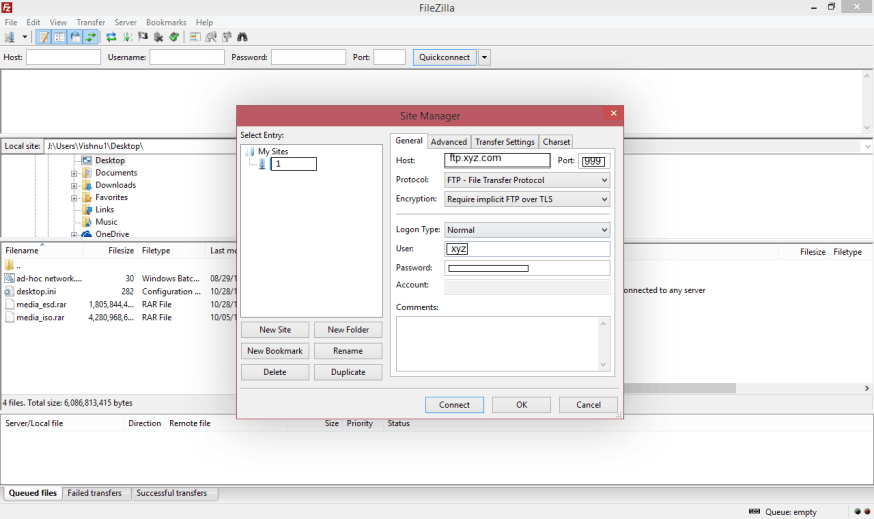
How FileZilla Handles File Transfers
File transfers are a fundamental part of working with remote computers, websites, and networked storage. While cloud platforms often hide the technical details behind a simple interface, traditional file transfer tools make the process more visible. The filezilla program is a useful example because its graphical environment allows users to see local and remote files while they are being transferred. Understanding how the filezilla client handles these operations can therefore provide a clearer picture of what happens whenever information moves between two computers.

Choosing a Reliable FTP Client
Choosing software for transferring files between a computer and a remote server is easier when the underlying requirements are understood first. An ftp client can look simple on the surface, yet different applications may vary in protocol support, interface design, security features, transfer management, and compatibility. For readers researching FileZilla, these considerations are especially useful because understanding what makes a dependable client is more valuable than choosing software based on appearance alone.

FileZilla Features Worth Understanding
Understanding the features of a file transfer application is easier when each function is considered in relation to the task it performs. FileZilla is commonly used as an example of a graphical environment for interacting with remote files, and the filezilla program brings several familiar file management concepts together in one interface. For beginners, learning what these features represent can be more useful than simply memorising where individual buttons are located.

FTP Connections Explained for Beginners
An FTP connection is a communication link between a local computer and a remote server that allows files and directory information to be exchanged. Although the concept may sound technical, the basic idea is straightforward. A user works with files on one computer and connects to another system through a network. An ftp client provides the interface for establishing and managing this connection, making it possible to work with remote files without entering every network command manually.
Safe Practices for FTP File Transfers
File transfers can be convenient, but moving information between computers also requires attention to security. FTP was developed at a time when network environments were very different from those of today, and traditional FTP does not provide the encryption expected from many modern communication methods. Understanding how secure transfers differ from basic file transfers is therefore an important part of learning about the filezilla program and the wider technology surrounding remote file management.