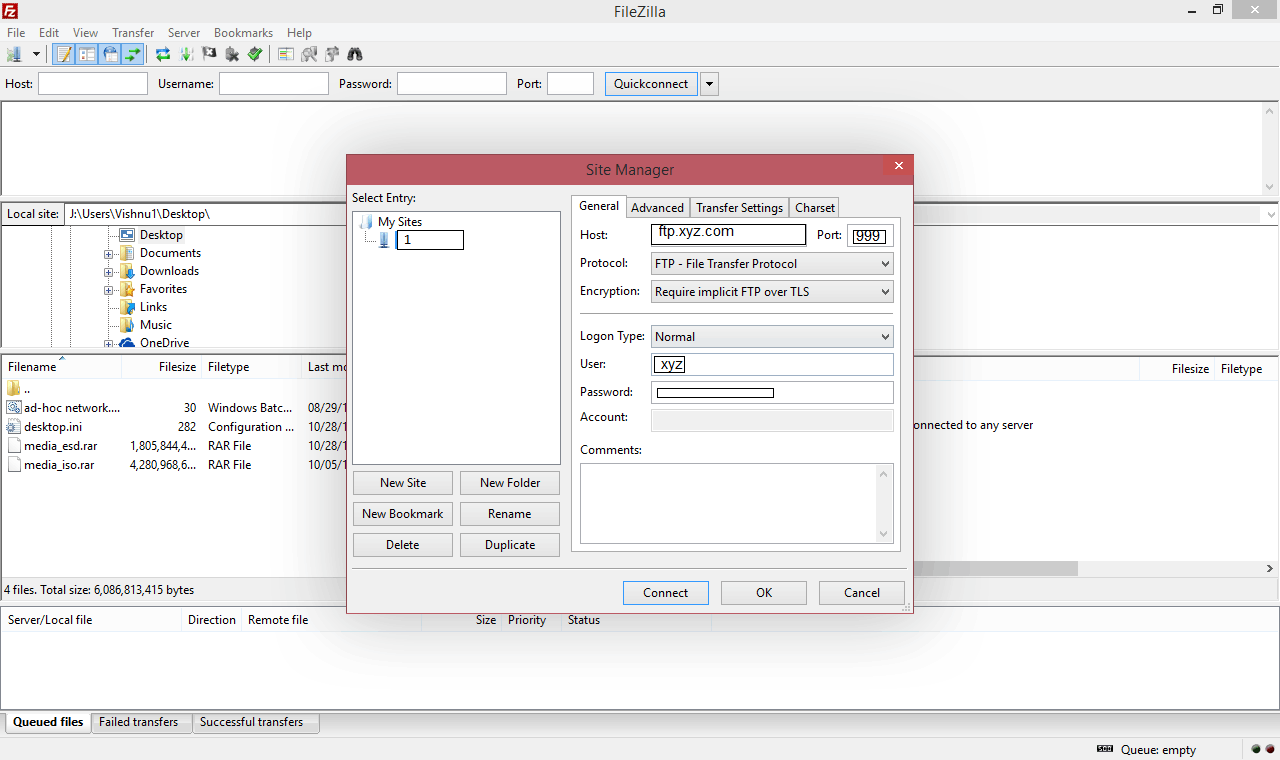
File transfers are a fundamental part of working with remote computers, websites, and networked storage. While cloud platforms often hide the technical details behind a simple interface, traditional file transfer tools make the process more visible. The filezilla program is a useful example because its graphical environment allows users to see local and remote files while they are being transferred. Understanding how the filezilla client handles these operations can therefore provide a clearer picture of what happens whenever information moves between two computers.
At its simplest, a file transfer involves two locations. One location is the local computer where a file currently exists, while the other is a remote server where the file may need to be stored or retrieved. An ftp client acts as an intermediary between the user and the remote system. After establishing a connection, the application communicates with the server and requests specific operations. With the filezilla client, these operations are presented through a graphical interface rather than requiring users to enter every command manually.
Before a transfer can take place, the client needs to establish communication with the server. This generally involves entering an address that identifies the remote system and providing appropriate authentication information. Depending on the server configuration, a connection may also require a particular port and protocol. When users research a filezilla download, they may initially focus on installing the application, but understanding these connection details is just as important for understanding how the software functions.
Once a connection has been established, the filezilla client typically displays information about both sides of the transfer. Local directories can be browsed alongside directories available on the remote server. This arrangement makes it possible to identify the source and destination before moving data. A user can select a file stored locally and initiate an upload, or select a remote file and request a download. The filezilla program then manages the communication necessary to complete the requested operation.
The term filezilla ftp is often used to describe this workflow because FTP is one of the protocols associated with traditional file transfer. FTP defines how a client and server communicate about files and directories. It is important to distinguish the protocol from the application itself. The filezilla program provides the interface and implements communication methods, while FTP provides a standardized framework for transferring information between compatible systems.
When an upload begins, the client reads the selected local file and sends its contents to the remote server according to the connection protocol. During a download, the process is reversed: information is received from the server and written to a location on the local computer. Larger transfers can take longer because their duration depends on factors such as file size, network speed, server performance, and connection conditions. An ftp client can display transfer activity so that users can see whether an operation is waiting, progressing, completed, or unsuccessful.
File transfers do not always succeed on the first attempt. A server may reject authentication, a connection can be interrupted, or the requested remote directory may not allow the intended operation. In such situations, the interface of the filezilla client can provide useful information about what happened. Reading these messages is an important part of troubleshooting because they can distinguish between a network problem, a permission issue, an incorrect server address, or another configuration problem.
Security is another consideration when examining how file transfers work. The basic FTP protocol was designed for network communication without the encryption mechanisms expected from many modern secure services. For this reason, users should understand the difference between FTP and encrypted alternatives. When exploring filezilla ftp capabilities, the important question is not simply whether a transfer application is installed, but which protocol is being used for a particular connection and how that protocol protects information during transmission.
The software itself is only one part of the transfer process. A filezilla client download gives a user access to the application, but the application still depends on a functioning remote server and suitable credentials. This is similar to other networking tools: installing a client does not automatically provide access to every server. The client, server, network, authentication method, and protocol must all work together for a successful transfer.
Search terminology can sometimes create additional confusion. People looking for the software may enter filezilla download or filezilla client download when researching installation options. Others may accidentally search for filezila, which is a common spelling variation of the name. Queries involving filezila com should also be approached carefully because the appearance of a familiar product name in a domain does not by itself establish that the website is an official source. Verifying the identity and reliability of a website is therefore a useful part of responsible software research.
Another useful concept is the transfer queue. When several files are selected, an ftp client can manage them as a sequence of operations instead of requiring every transfer to be started independently. This is particularly helpful when working with directories containing many files. The queue also provides a way to observe pending and completed operations. Through this process, the filezilla client makes potentially complicated groups of transfers easier to monitor.
The graphical approach is one reason the filezilla program can be useful for learning about file transfer. Instead of treating the process as an invisible exchange of data, the interface exposes important elements such as directories, filenames, transfer status, and connection information. Beginners can therefore develop an understanding of the relationship between their computer and a remote server. More experienced users can use the same visual information to monitor routine operations and identify problems.
A filezilla download is ultimately only the starting point for learning how the technology works. Once users understand the distinction between local and remote files, the role of an ftp client, the purpose of authentication, and the importance of the selected protocol, the transfer process becomes much easier to understand. The filezilla client provides a practical environment for observing these concepts, while the broader principles apply to many other networked file management systems. Learning those principles is more valuable than memorising a particular sequence of interface actions because they remain relevant across different applications and server environments.